
PBS LearningMedia: Free PreK–12 Classroom Videos, Interactive Lessons & Teacher Resources
Stream free PreK–12 classroom videos, interactive lessons, and standards-aligned teaching guides curated from PBS programs like NOVA and Nature.
What is PBS LearningMedia?
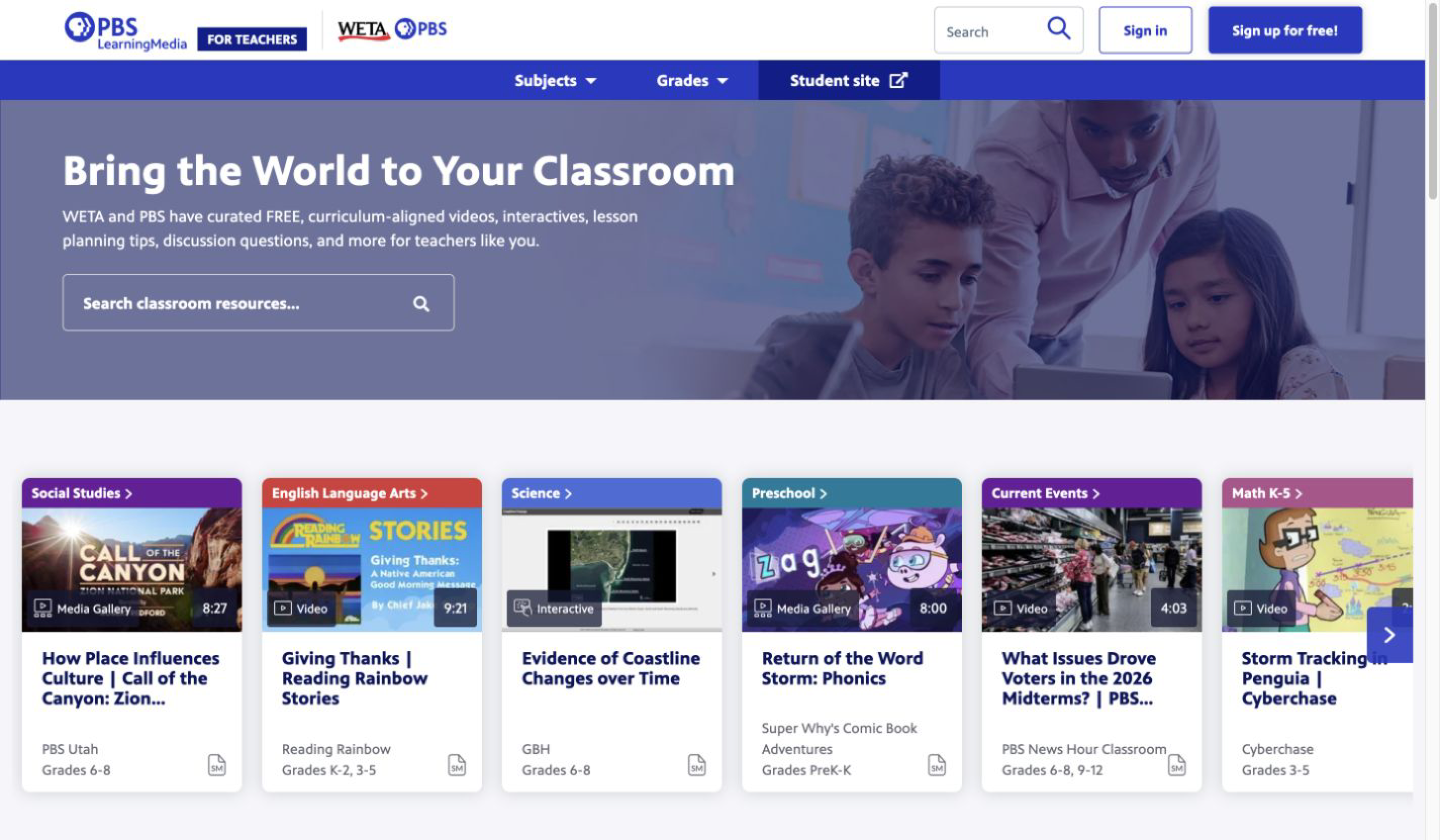
Co-developed by PBS and WGBH with public media stations across the United States, PBS LearningMedia is a completely free PreK–12 digital curriculum library built around short, classroom-ready media clips, interactive student lessons, primary source galleries, and printable lesson plans. Rather than asking teachers to scrub through hour-long documentaries or sit through YouTube pre-roll ads, editors trim flagship series—including NOVA, Nature, FRONTLINE, Ken Burns historical films, Crash Course, and PBS KIDS—into 2-to-10-minute teaching segments paired with background essays, discussion questions, vocabulary sheets, and US national/state standards tags. Both casual browsing and registered accounts cost USD 0 with no paid subscription tier; signing in with a free educator account unlocks folders, Lesson Builder customization, and direct Google Classroom roster syncing.
How to find & assign free K–12 lessons on PBS LearningMedia
- Visit pbslearningmedia.org and filter the catalog by Subject (Science, Social Studies, ELA, Math, Arts, Engineering, World Languages), Grade band (PreK–K up to 9–12), or Resource Type (Video, Interactive Lesson, Media Gallery, Lesson Plan).
- Open a resource page to stream the video with closed captions and interactive transcripts, and expand Support Materials underneath for teacher prep notes, discussion prompts, and downloadable student handouts.
- Create a free Educator account (USD 0) if you want to organize units into folders, customize slides and comprehension questions in Lesson Builder, or generate a quick assignment code for pbslearningmedia.org/student.
- Connect Google Classroom inside your teacher dashboard to import class rosters, push interactive lessons directly to students, and review completion responses.
Curated PBS video clips, interactive lessons & Google Classroom sync
Classroom-length clips from NOVA, Nature, Ken Burns & PBS KIDS
Replaces unvetted video searches with editorially vetted 2-to-10-minute documentary, lab, and early-learning clips complete with closed captions, transcripts, and Spanish-language filters where available.
Standards-aligned lesson plans, handouts & primary sources
Most media items bundle ready-to-use teaching tips, warm-up and exit-ticket questions, downloadable PDF graphic organizers, and alignments to NGSS, Common Core, and state standards.
Self-paced interactive lessons for students
Multi-page digital modules blend short videos, diagrams, note-taking boxes, drag-and-drop checks, and short-answer reflections that students complete at their own pace.
Free Lesson Builder & Google Classroom roster integration
Registered teachers can combine PBS media with custom instructions and comprehension questions at no cost, then assign via student join codes or synced Google Classroom rosters.
PBS LearningMedia Guest browsing vs Free Educator & Student accounts
On narrow screens, scroll the table sideways, or focus it and use the arrow keys.
| Capability / limit | Guest Visitor (No login) | Free Student Account / Code | Free Educator Account |
|---|---|---|---|
| Price & subscription wall | USD 0 (funded by public broadcasting & grants) | USD 0 | USD 0 (no paid Pro tier exists) |
| Streaming videos & reading support PDFs | Browse & stream public resources; repeated deep use prompts free sign-in | Full access to assigned videos, media galleries & interactive modules | Unlimited streaming, video downloads (where cleared) & teacher answer keys |
| Lesson Builder & custom quizzes | Not available without signing in | Completes teacher-built lessons & submits responses | Full Lesson Builder access to mix PBS media with custom questions |
| Google Classroom & roster tracking | Public URL sharing only | Signs in via Google or student code to save work | Imports Google Classroom rosters, assigns work & tracks student completion |
| Saved folders & state standards | Session-only browsing | Saves personal favorites | Unlimited custom folders, shareable resource boards & local station standards |
Use cases
- Launch middle- and high-school science or US/world history lessons with a 5-minute NOVA or Ken Burns primary-source hook and printed discussion guide
- Assign self-paced Interactive Lessons through Google Classroom for substitute-teacher days, flipped homework, or independent station rotations
- Pull ad-free PreK–2 PBS KIDS clips and printable family activities for early elementary science, social-emotional learning, and reading units
Who is it for?
PreK–12 classroom teachers, homeschoolers, and curriculum specialists seeking high-trust, ad-free documentary clips, primary sources, and ready-to-teach lesson plans at zero cost.
Before you choose
- What to bring
- A grade band and topic to teach; add a free PBS LearningMedia Educator account (and optional Google Classroom link) if you want to assign interactive work.
- What you get
- Ad-free 2-to-10-minute PBS video segments, primary-source galleries, printable PDF handouts, and self-paced student interactive lessons.
- What to check
- Check regional streaming icons before class if you teach outside the United States—some broadcast-licensed clips are geo-restricted to US IP addresses or carry rights expiration dates.
PBS LearningMedia excels at documentary hooks, real-world science phenomena, and social studies primary sources, rather than daily skill drills. Pair it with Khan Academy when students need step-by-step math problem sets and mastery tracking, ReadWorks for leveled K–12 reading comprehension passages, or Blooket to turn video vocabulary into a quick live review game. Browse more classroom combinations in our learning tools guide.
Limitations & regional playback rules to check
- Certain documentary and broadcast clips carry geographic licensing restrictions (US-only playback) or rights-expiration dates noted on the resource page.
- PBS LearningMedia is a curated resource library rather than a mastery-based LMS—it does not run adaptive math/reading diagnostics across an entire school year.
- Unregistered visitors cannot build custom lessons, view certain teacher-only answer keys, or sync Google Classroom rosters without completing a free sign-up.
- Downloadable offline MP4 files are only offered on clips where PBS holds download clearance; stream-only items require live classroom internet.
Questions about PBS LearningMedia
Is PBS LearningMedia really 100% free for teachers and students?
Yes. PBS LearningMedia costs USD 0 with no paid tier or trial countdown. Public media funding covers streaming videos, downloadable handouts, Lesson Builder authoring, and Google Classroom integration once you register a free account.
What do you get with a free PBS LearningMedia account vs browsing logged out?
Logged-out visitors can search and play standard videos, while a free Educator account unlocks Lesson Builder, custom folders, downloadable media (where rights permit), state-standard personalization, student assignment codes, and Google Classroom roster syncing.
Does PBS LearningMedia integrate with Google Classroom?
Yes. Teachers who sign in with a linked Google account can import Google Classroom rosters, assign videos or multi-page Interactive Lessons directly to classes, and review student completion and written answers inside PBS LearningMedia.
Can PBS LearningMedia videos be streamed outside the United States?
Many WGBH- and PBS-produced clips and interactive lessons play worldwide, while certain third-party co-productions carry US-only streaming rights. Always test playback on your network before building a lesson around a specific clip.
Official & primary sources: PBS LearningMedia official library ↗ · PBS LearningMedia subject & grade directory ↗ · PBS LearningMedia student assignment portal ↗ · Checked Nov 21, 2026
Related website guides

Have a website to share?
See how listing works ↗