
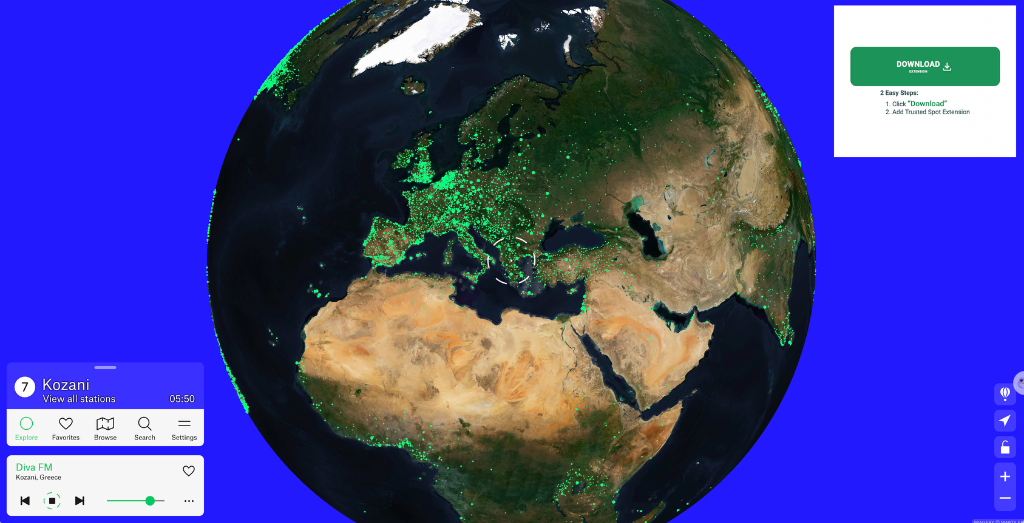
Radio Garden (radio.garden) is an interactive web player and mobile app that plots more than 40,000 live internet and FM/AM radio streams as clickable green dots on a rotating 3D globe. Opening the site starts live playback immediately with no account, email signup, or paywall: you drag the globe to a city—from Reykjavik and Buenos Aires to Tokyo or a small regional town in West Africa—to hear what local residents are listening to in real time. The browser version is free and supported by a corner display ad, while optional iOS and Android apps offer a low-cost ad-free upgrade with extra playback controls.
Radio Garden at a Glance
| Attribute | Verified Details |
|---|---|
| Official Website | radio.garden |
| Mobile Apps | iOS (App Store) and Android (Google Play) |
| Created By | Originally launched in 2016 with the Netherlands Institute for Sound & Vision & Studio Puckey; operated by Radio Garden B.V. (Amsterdam) |
| Catalog Size | 40,000+ live 24/7 radio streams across thousands of cities and towns |
| Signup Required? | No — listening, searching, sharing links, and saving browser favorites all work without an account |
| Pricing & Ads | Free on web and mobile (supported by visual banner/pop-up ads); optional Premium mobile subscription (~$2.99/month or ~$24.99/year) removes platform display ads and unlocks an audio equalizer + sleep timer |
| Key Geographic Limit | Listeners connecting from UK IP addresses are restricted to UK-based stations due to regional broadcast licensing rules |
How the Globe Interface Works
Unlike traditional radio directories organized by country dropdowns and bitrate tables, Radio Garden treats geography as the tuning dial:
- Green Dots = Broadcasting Cities: Every green dot on the satellite globe marks a city or town with at least one active 24/7 radio stream. Larger clusters indicate major media hubs with dozens or hundreds of stations (such as London, São Paulo, Paris, or Tokyo), while isolated dots often surface single community or island transmitters.
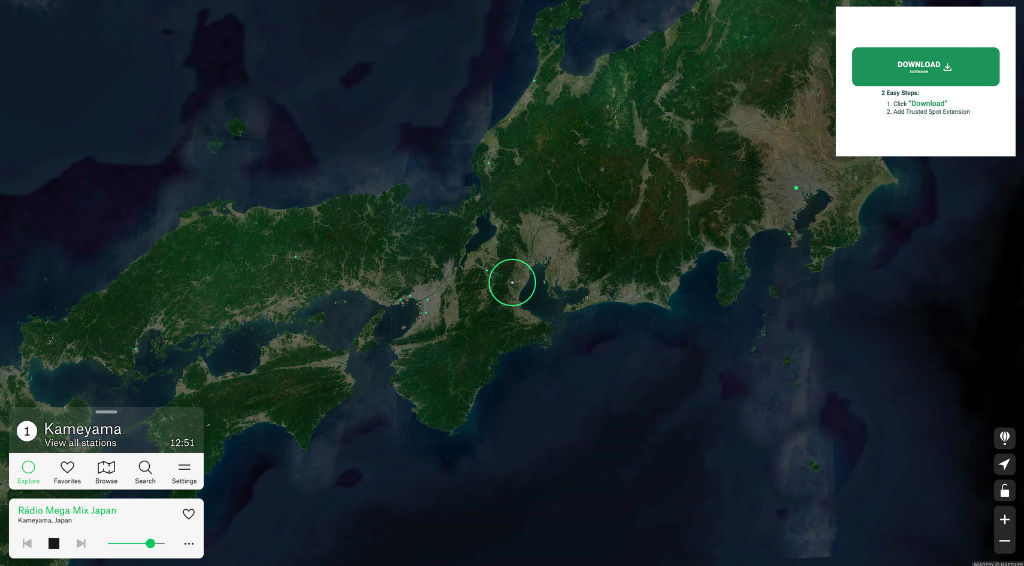
- Center Ring Locking: Rotating the globe until a green dot snaps into the center reticle automatically tunes into that city's default station and displays the local time at the broadcast location.
- Switching Stations Within a City: Once locked onto a city, a station list opens in the lower panel so you can flip between local news talk, college radio, regional folk music, or commercial pop transmitters in the same area.
Because playback begins within seconds of landing on the page—with zero onboarding forms—the site sustains millions of monthly visits and average listening sessions exceeding four minutes, while funding bandwidth primarily through non-audio display advertising in the upper corner of the screen.
Built-In Features Beyond Spinning the Map
Most first-time visitors only drag the globe manually, missing five navigation tools split between the bottom-left toolbar (Explore, Favorites, Browse, Search, Settings) and the floating control stack on the lower right:
| Control / Tab | What It Does | When to Use It |
|---|---|---|
| Browse (Map Icon) | Editorial collections (such as Rare Tongues, Island Life, and Musical Roots) plus structured country listings | Finding unusual stations or endangered languages without hunting dot by dot |
| Favorites (Heart Icon) | Saves specific stations and cities locally in your browser or mobile app | Building a personal quick-dial list across time zones without creating an account |
| Balloon Mode (Right Sidebar) | Floats smoothly across random stations around the planet | Hands-free background discovery while working or studying |
| Padlock Toggle (Right Sidebar) | Locks playback onto your current station so dragging the globe does not switch streams | Exploring other continents visually without losing a broadcast you enjoy |
| Search | Finds stations, cities, or countries by keyword | Jumping straight to a known call sign, genre keyword, or hometown station |
Every station and city view also generates a clean permalink (radio.garden/listen/... or radio.garden/visit/...), making it straightforward to share a specific broadcast in a message or bookmark bar.
Four Practical Ways People Use Radio Garden
1. Real-Time Cultural & Music Discovery
Streaming algorithms tend to recommend tracks similar to what you already play. Tuning into a small municipal station in Patagonia, Dakar, or Okinawa bypasses algorithmic filtering entirely—exposing you to regional genres, local weather reports, community announcements, and live DJ transitions at that city's actual hour of the day.
2. Unscripted Foreign Language Immersion
Language learners use Radio Garden to practice listening comprehension against natural, full-speed speech—including regional accents that textbook audio rarely covers (for example, comparing Madrid talk radio with Buenos Aires or Bogotá broadcasts). If you pair passive radio immersion with active study, you can combine Radio Garden with subtitle and reading tools listed on Reemo such as Language Reactor, Trancy, or Readlang.
3. Browser Background Listening Without App Installs
Because Radio Garden runs entirely in a standard browser tab with no account login or desktop client installation, people frequently use it on Chromebooks, shared workstations, and locked-down study or office computers where installing Spotify or desktop streaming apps is inconvenient.
4. Submitting an Independent 24/7 Internet Station
Community broadcasters can apply to place their own green dot on the globe through Settings → Submit a Station (submit.radio.garden). Official technical rules require:
- A continuous 24/7 live broadcast (part-time shows or on-demand podcasts are rejected).
- A direct HTTPS audio stream URL (such as MP3 or AAC over SSL, rather than a link to an HTML webpage).
- A verifiable town or city location where the station is based or targeted.
Ads, Pricing, and Limitations to Know First
Before relying on Radio Garden as a daily background player, check four practical constraints:
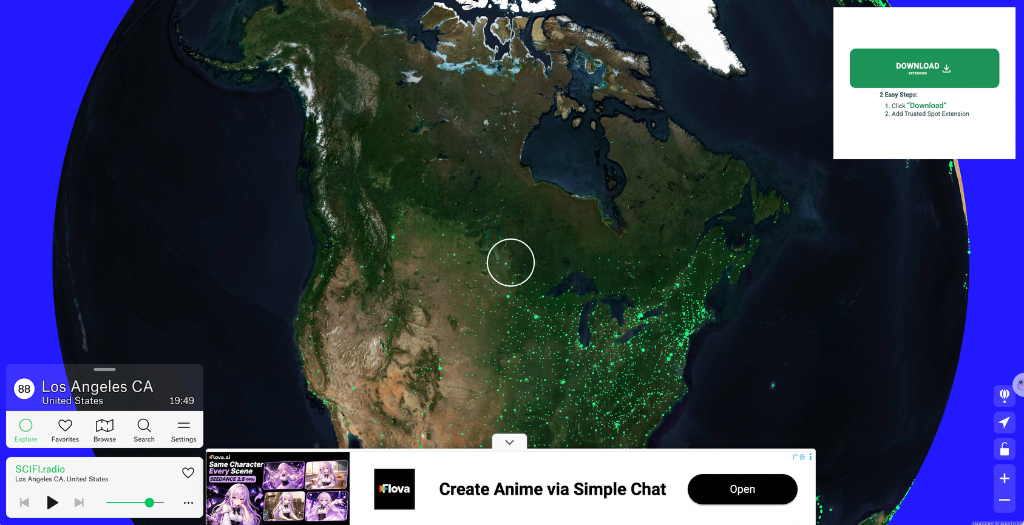
- Platform Display Ads vs. Broadcast Commercials: On the web, Radio Garden displays visual banner ads (in the upper-right corner and occasionally along the bottom edge) rather than interrupting streams with its own pre-roll audio commercials. Note that Radio Garden works natively in the browser—ignore third-party programmatic
"Download Extension"banner ads that sometimes appear in the corner ad slot. As noted in independent evaluations such as PCMag's review of Radio Garden, paying for the mobile ad-free subscription removes Radio Garden's visual pop-ups and adds an equalizer and sleep timer, though you will still hear whatever local spoken commercials an FM/AM station broadcasts natively on air.
- UK International Listening Restriction: Following UK copyright rulings on international radio directory links (documented in Radio Garden's licensing history), visitors accessing
radio.gardenfrom the United Kingdom can only tune into UK domestic stations unless connecting from outside the UK. - Time-Zone Reality (Live Only, No Rewind): Because every dot is a live feed, spinning to the opposite side of the planet during its 3:00 AM window often lands on automated overnight playlists rather than daytime hosts. There is no scrub bar or archive replay.
- Favorites Are Device-Local: Because Radio Garden does not force account registration, stations saved with the Heart icon in a desktop browser are stored in local browser data and do not automatically sync to your phone—Clearing browser site data wipes your saved list.
Radio Garden vs. Similar World Radio & Music Map Websites
If you want global audio or visual discovery with different controls—such as historical decades, home window views, or street-level video—compare these five browser-friendly platforms:
| Website | Core Concept | Live vs. Recorded | Signup & Cost |
|---|---|---|---|
Radio Garden (radio.garden) |
3D satellite globe of 40,000+ live local radio stations | 100% live 24/7 broadcasts | Free, no signup (display ads; optional ~$2.99/mo app upgrade) |
Radiooooo (radiooooo.com) |
World map filtered by decade (1900s to present) and mood (Slow, Fast, Weird) | Curated recorded tracks uploaded by contributors | Freemium (limited free access; account & paid subscription for full map/decades) |
Drive & Listen (drivenlisten.com) |
Dashcam street-driving videos from 50+ world cities paired with local FM radio | Recorded 4K city drives + live radio streams | Free in browser |
TuneIn (tunein.com) |
Traditional audio aggregator for commercial FM/AM, live sports, news networks, and podcasts | Live radio + on-demand podcasts | Freemium (audio pre-roll ads + TuneIn Premium paywalls on sports/news) |
Famelack / TV Garden (famelack.com) |
Applies the interactive globe concept to public, free-to-air international TV channels rather than radio | Live public TV streams | Free in browser |
Choose Radio Garden when you want zero-friction live local radio from thousands of small towns as well as capitals. Choose Radiooooo if you specifically want curated vintage music from a country and decade (such as 1970s Ethiopian jazz or 1960s Brazilian bossa nova) rather than live talk and commercials, or pair Radio Garden with WindowSwap to watch calm 10-minute home window views from around the world while a local broadcast plays in the background.
Questions About Radio Garden
Is Radio Garden completely free to use?
Yes. On desktop and mobile browsers, Radio Garden is free to use without creating an account or entering payment details, supported by visual display banners. On iOS and Android, the base app is also free, with an optional subscription (around $2.99/month or $24.99/year depending on region) that removes pop-up ads and adds a sleep timer and audio equalizer.
Why can I only listen to UK stations on Radio Garden in the UK?
Due to UK music licensing and copyright enforcement affecting international radio aggregators, Radio Garden restricts UK IP addresses to UK-based radio broadcasts. Listeners outside the UK retain access to the full global map.
Does Radio Garden use my location or require login permissions?
No login is required. Your browser may optionally ask for location permission if you tap the compass/locate button to center the globe on your hometown, but you can decline permission and spin or search the entire globe manually.
How do I save my favorite stations across sessions?
Click or tap the Heart icon while a station is playing to add it to your Favorites tab. On the web, favorites are stored in your browser's local storage, so keep site data enabled for radio.garden or bookmark individual station URLs if you switch devices.
Source review: This guide is based on Radio Garden's public web platform (radio.garden), official station submission rules, mobile app tier features, and regional licensing documentation, checked on November 16, 2026. Traffic and session context reflects public third-party web analytics estimates rather than audited company financials.
Websites in this guide
Open each Reemo listing for its purpose, access details, and official website.
- Radio GardenSpin an interactive 3D globe to stream over 40,000 live local radio stations from cities worldwide without signing up.