
Xnapper for Mac: Instant Beautiful Screenshots, Auto-Redact & $29.99 Perpetual License
Snap auto-balanced Mac screenshots with instant gradient backgrounds, 1-click email/key redaction, and OCR—free with watermark or $29.99 once.
What is Xnapper and why do Mac creators use it over raw screenshots?
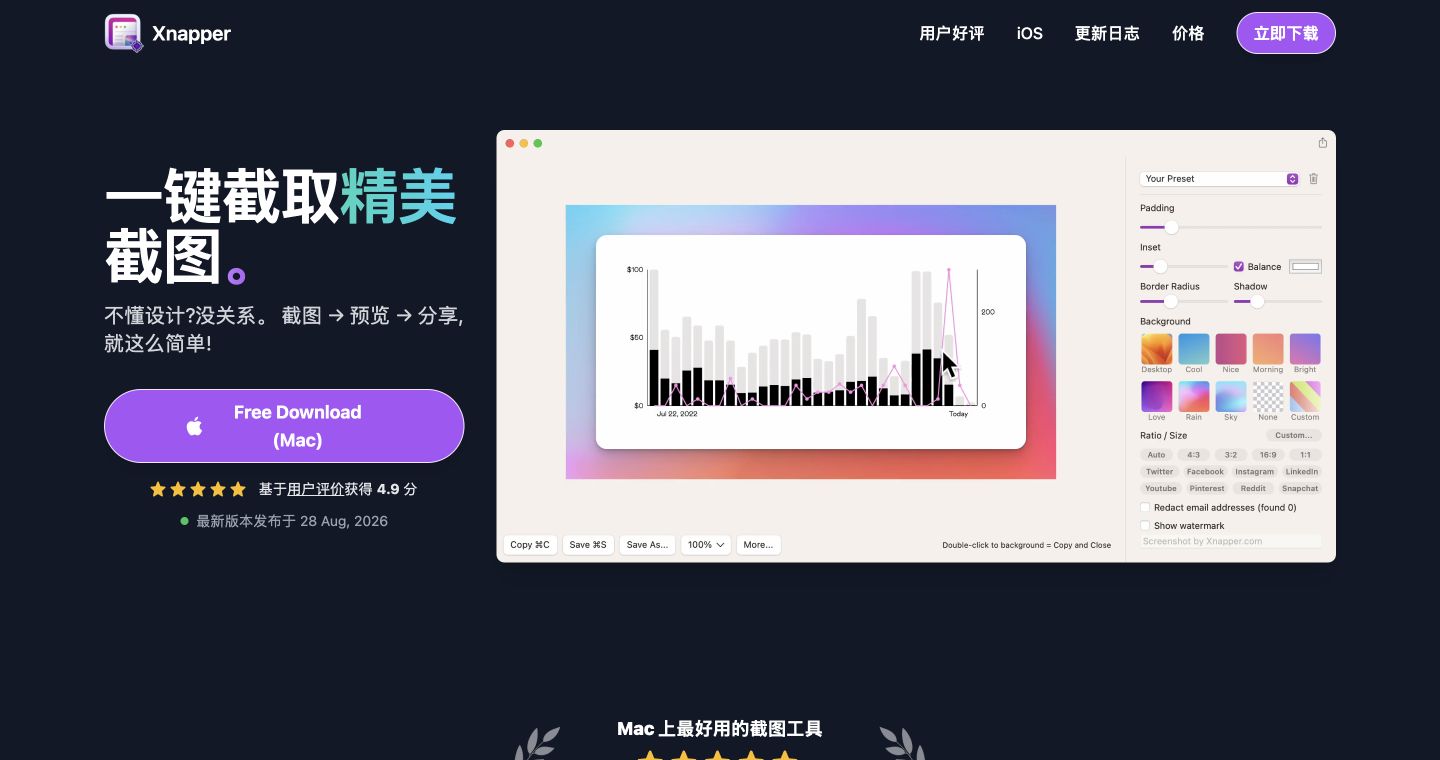
Xnapper (xnapper.com) is a fast, native macOS screenshot beautifier built by indie maker Tony Dinh (creator of TypingMind and DevUtils). Raw macOS screenshots look flat and off-center when pasted into X posts, changelogs, or landing pages. Xnapper styles them in two seconds without opening Figma or Canva. Snap any region or window, and Xnapper centers the visual subject automatically. It samples a matching gradient from your screenshot colors, adds soft rounded shadows, and masks private emails or API keys in one click. You can run Xnapper for free indefinitely on macOS 10.15+ with a watermark, or remove the watermark forever with a USD 29.99 one-time Basic license.
How to snap, auto-redact & share styled screenshots in 2 seconds
- Press your custom macOS shortcut (or hit Space for clean window capture). You can also drop an image from Finder or your clipboard into Xnapper.
- Let Xnapper auto-balance uneven padding and sample a matching gradient background. Then pick a ratio like 16:9, 4:3, 1:1, or X and Instagram presets.
- Click Auto-Redact to mask emails, card numbers, IPs, and API keys on-device. Add quick arrows or copy visible text straight via macOS Vision OCR.
- Copy the compressed PNG or JPEG to your clipboard or save to disk. Test it at $0 with a watermark, or enter a $29.99+ perpetual key for clean exports.
Auto-balance, 1-click sensitive data redaction, Apple Vision OCR & social ratios
Auto-balance centering & adaptive background sampling
Detects off-center UI crops and evens out borders automatically, pairing your capture with color-matched gradients, rounded corners, and adjustable drop shadows.
One-click automatic redaction for emails, cards, IPs & API keys
Scans your screenshot locally to spot sensitive strings like email addresses, payment cards, IPv4 addresses, and secret tokens, masking them in a single click.
On-device macOS Vision OCR, social ratios & image compression
Extracts selectable text offline via Apple Vision, locks output dimensions to X, LinkedIn, Instagram, or YouTube cards, and compresses file weight before upload.
Pay-once perpetual Mac license with locked 40% update discount
Includes 1 year of updates and permanent ownership of your installed version, with optional future update renewals locked at 40% off your original purchase price.
Xnapper Free (watermarked) vs $29.99 Basic, $54.99 Personal & $79.99 Standard
On narrow screens, scroll the table sideways, or focus it and use the arrow keys.
| Tier / entitlement | Free Download ($0) | Basic ($29.99) & Personal ($54.99) | Standard ($79.99) & Team ($5/mo) |
|---|---|---|---|
| Price & billing model | USD 0 — no trial timer, no card required | One-time via Paddle: Basic $29.99 (1 Mac), Personal $54.99 (2 Macs) | Standard: $79.99 once (3 Macs); Team: $5/device/mo billed yearly |
| Export watermark | Includes visible Xnapper watermark on exports | No watermark — clean commercial exports | No watermark across all licensed Macs |
| Updates & refund policy | Free public macOS releases | Keep app forever + 1 yr updates (optional 40%-off renewal); 30-day refund | Standard: perpetual + 1 yr updates; Team: continuous updates while active |
| Styling, auto-redact & OCR | Auto-balance, gradients, auto-redact & Vision OCR | Full styling presets, screenshot history & output compression | Full feature set for multi-Mac pros and teams |
| Supported OS & video scope | macOS 10.15+ only (still screenshots only) | macOS 10.15+ (iOS app is licensed separately) | macOS 10.15+ — no Windows app, no screen video recorder |
Use cases
- Turn rough code snippets, Stripe dashboards, or analytics charts into centered, color-framed X (Twitter) and LinkedIn visuals in two seconds
- Mask customer email addresses, IP logs, and secret keys in one click before posting bug reports or public SaaS changelogs
- Standardize product documentation thumbnails using saved padding, shadow, and aspect-ratio presets across launches
Who is it for?
Indie hackers, developer-creators, and SaaS marketers on macOS who post frequent product screenshots on X or changelogs and want instant visual polish under a $29.99 pay-once license.
Before you choose
- What to bring
- A live macOS screen region, active app window, clipboard image, or local PNG/JPEG file.
- What you get
- A centered, background-framed, redacted, and compressed still image sized for social feeds, blogs, or docs.
- What to check
- Always eyeball auto-redacted screenshots yourself before publishing to catch unusual secret formats, and note that Xnapper does not record video or scrolling web pages, and its iOS app requires a separate purchase.
Choose Xnapper when your #1 job is turning plain Mac screenshots into clean social/changelog graphics in two seconds for a $29.99 one-time fee. If you also need scrolling capture, pinned floating reference windows, and quick video/GIF recording in one Mac utility, pick CleanShot X; for a fast free pixel-measurement screenshot tool, check Shottr; for cinematic auto-zoom video demos, use Screen Studio; and for Windows + Mac step-by-step SOP guides, compare Snagit in Productivity tools.
No video/scrolling capture, free watermark & separate iOS license rules
- Still images only (no video recording or scrolling capture): Xnapper cannot record MP4/GIF screen demos or stitch tall scrolling web pages—tasks handled by CleanShot X, Shottr, or Snagit.
- Visible watermark on the $0 Free tier: although there is no day-limit countdown, every free export carries a watermark until you buy at least the $29.99 Basic license.
- macOS-only desktop app & separate iOS license: requires macOS 10.15 or later with no Windows or Linux desktop version, and buying the Mac license does not unlock Xnapper for iOS.
- Heuristic auto-redaction still needs human review: 1-click redaction catches standard emails, cards, and IPs well, but custom internal tokens or low-contrast text should always be double-checked manually.
Xnapper watermark, perpetual updates & CleanShot X comparison FAQ
Is Xnapper free, and how do you remove the watermark?
You can download and use Xnapper on macOS for free with no time limit, including auto-balance, background gradients, and OCR, but exported images include a watermark. Buying a one-time license—starting at USD 29.99 for Basic (1 Mac), USD 54.99 for Personal (2 Macs), or USD 79.99 for Standard (3 Macs)—removes the watermark permanently.
What happens after 1 year on Xnapper's one-time perpetual license?
Your license key lets you keep using your installed Xnapper version indefinitely without paying again. One year of free updates is included upfront; if you want newer updates after year one, you can optionally renew for another year at a permanently locked 40% discount off your original purchase price (plus a 30-day money-back guarantee on new purchases).
Is there an Xnapper version for Windows, and does a Mac key cover iOS?
No on both counts. Xnapper's desktop app is built natively for macOS 10.15+ (relying on Apple's Vision framework for local OCR and redaction) with no Windows build. Xnapper also offers an iOS app, which is licensed separately from the macOS desktop keys.
Should I buy Xnapper or CleanShot X for Mac screenshots?
Buy Xnapper ($29.99 once) if you mainly share stylized single screenshots on X, LinkedIn, or blog posts and love instant auto-centering and 1-click email/API-key redaction. Choose CleanShot X if you need an all-around daily driver that also captures scrolling pages, pins floating screenshots on top of windows, and records quick screen videos and GIFs.
Official & primary sources: Xnapper Official Homepage & Feature Overview ↗ · Xnapper Official Pricing & Perpetual License Terms ↗ · Xnapper macOS Release Changelog ↗ · Checked Nov 25, 2026
Related website guides



Have a website to share?
See how listing works ↗